생활
Tkinter 알바비 산출 프로그램 도와주세요!
최저시급, 근무날짜, 근무시간을 입력받고 알바비를 계산하는 tkinter을 만들어야합니다..
야간수당, 추가수당,세금은 선택적 사항으로 예시로 야간수당을 선택하면 1.5배가 곱해지고 세금을 선택하면 3.3%가 깎이는 겁니다..
코딩 좀 도와주세요..ㅠ
+) 2개의 윈도우를 응용하는 방법도 알려주시면 감사합니다!
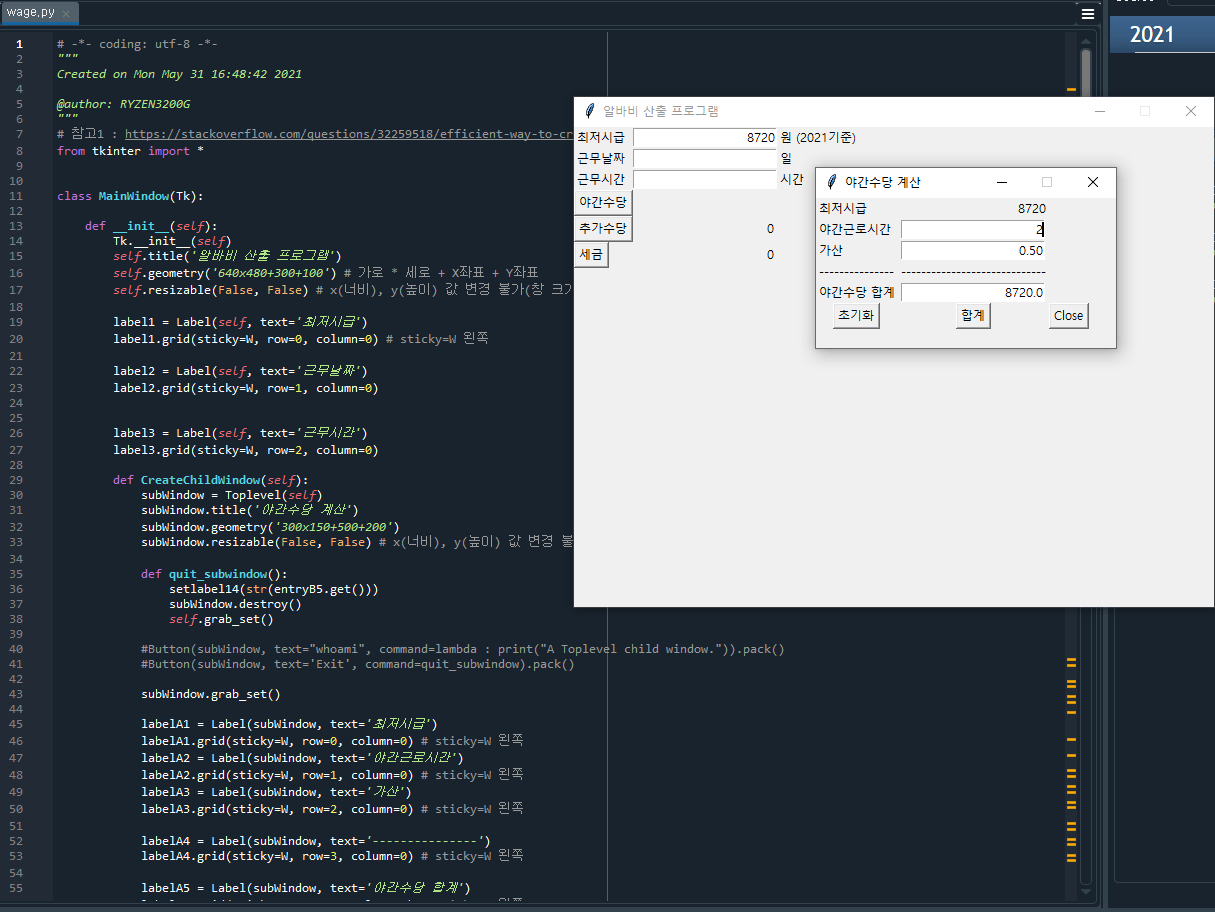
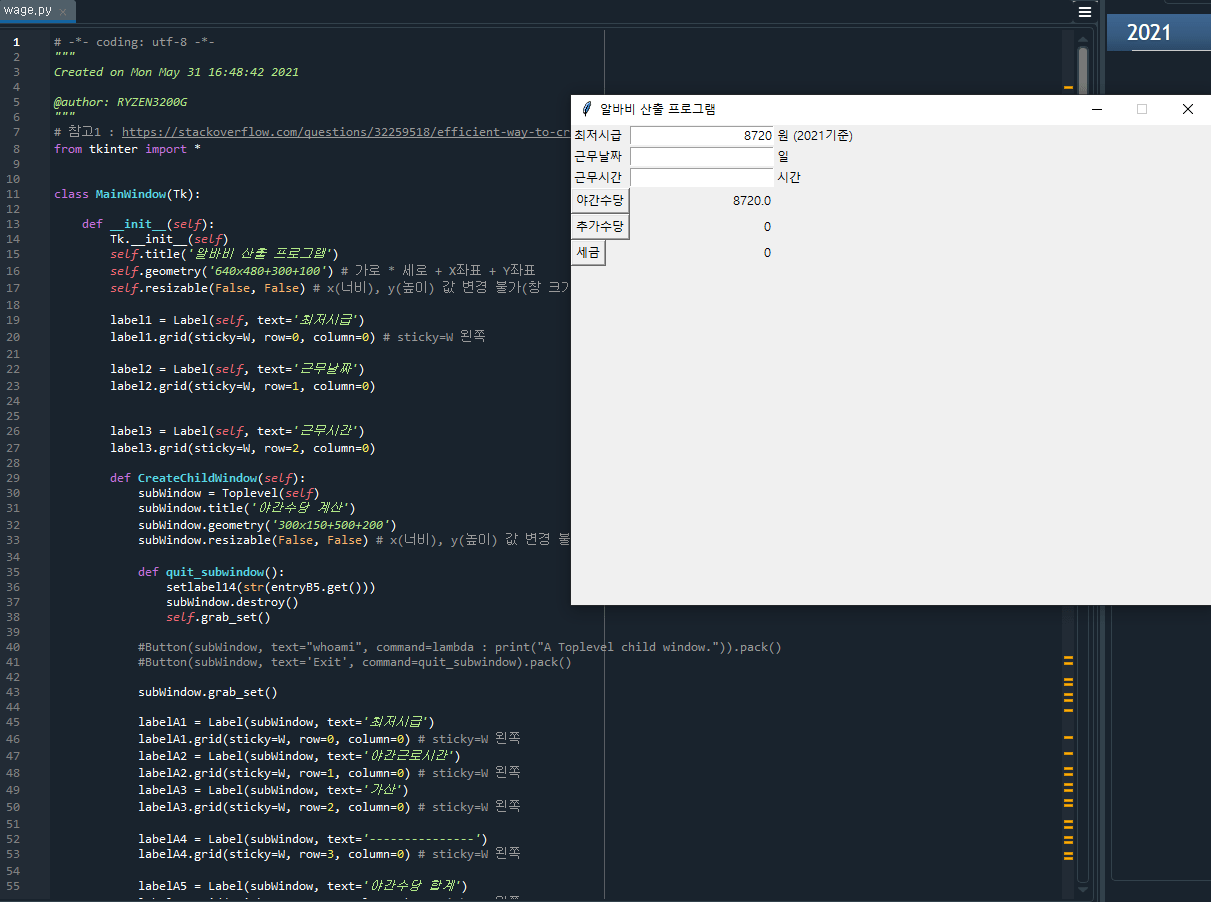
메인화면에서 야간수당 버튼을 클릭하면 새로운 윈도우창이 뜨고 그곳에서 계산된걸 첫번째 윈도우창에 레이블로 가져오고싶습니다.. 3일중 2일 밤새고있는데 답없어서 요청드립니다..
1개의 답변이 있어요!
소스코드 다운로드 : https://github.com/sigmak/exercise4_01/blob/2021-05-31-tkinter/wage.py
야간수당 버튼 기능 위주로 구현했으니까...참고 하세요...
[소스코드 wage.py]
# -- coding: utf-8 --
"""
Created on Mon May 31 16:48:42 2021
@author: raven90
"""
from tkinter import *
class MainWindow(Tk):
def init(self):
Tk.init(self)
self.title('알바비 산출 프로그램')
self.geometry('640x480+300+100') # 가로 * 세로 + X좌표 + Y좌표
self.resizable(False, False) # x(너비), y(높이) 값 변경 불가(창 크기 변경 불가)
label1 = Label(self, text='최저시급')
label1.grid(sticky=W, row=0, column=0) # sticky=W 왼쪽
label2 = Label(self, text='근무날짜')
label2.grid(sticky=W, row=1, column=0)
label3 = Label(self, text='근무시간')
label3.grid(sticky=W, row=2, column=0)
def CreateChildWindow(self):
subWindow = Toplevel(self)
subWindow.title('야간수당 계산')
subWindow.geometry('300x150+500+200')
subWindow.resizable(False, False) # x(너비), y(높이) 값 변경 불가(창 크기 변경 불가)
def quit_subwindow():
setlabel14(str(entryB5.get()))
subWindow.destroy()
self.grab_set()
#Button(subWindow, text="whoami", command=lambda : print("A Toplevel child window.")).pack()
#Button(subWindow, text='Exit', command=quit_subwindow).pack()
subWindow.grab_set()
labelA1 = Label(subWindow, text='최저시급')
labelA1.grid(sticky=W, row=0, column=0) # sticky=W 왼쪽
labelA2 = Label(subWindow, text='야간근로시간')
labelA2.grid(sticky=W, row=1, column=0) # sticky=W 왼쪽
labelA3 = Label(subWindow, text='가산')
labelA3.grid(sticky=W, row=2, column=0) # sticky=W 왼쪽
labelA4 = Label(subWindow, text='---------------')
labelA4.grid(sticky=W, row=3, column=0) # sticky=W 왼쪽
labelA5 = Label(subWindow, text='야간수당 합계')
labelA5.grid(sticky=W, row=4, column=0) # sticky=W 왼쪽
labelB1 = Label(subWindow, text=getE1())
labelB1.grid(sticky=E, row=0, column=1) # sticky=E 오른쪽
entryB2 = Entry(subWindow, width=20, justify='right') # 한줄에 입력값 받을때 사용
entryB2.grid(row=1, column=1)
entryB3 = Entry(subWindow, width=20, justify='right') # 한줄에 입력값 받을때 사용
entryB3.grid(row=2, column=1)
tmpNum = '0.50'
entryB3.insert(0,tmpNum)
labelB4 = Label(subWindow, text='-----------------------------')
labelB4.grid(sticky=W, row=3, column=1) # sticky=W 왼쪽
entryB5 = Entry(subWindow, width=20, justify='right') # 한줄에 입력값 받을때 사용
entryB5.grid(row=4, column=1)
def subIni():
entryB2.delete(0,END) # 라인 전체 삭제
entryB5.delete(0,END) # 라인 전체 삭제
def totsum():
tot = float(labelB1.cget("text")) float(entryB2.get()) float(entryB3.get())
entryB5.delete(0,END) # 라인 전체 삭제
entryB5.insert(0,str(tot))
Button(subWindow, text="초기화" ,command=subIni ).grid(row=5, column=0) # 초기화 버튼
Button(subWindow, text="합계", command=totsum).grid(row=5, column=1) # 합계 버튼
Button(subWindow, text="Close", command=quit_subwindow).grid(row=5, column=2) # 종료 버튼
def click4():
popupwin = CreateChildWindow(self)
return popupwin # 해결방법 : https://stackoverflow.com/questions/47549304/attributeerror-nonetype-object-has-no-attribute-mainloop
def getE1():
return e1.get()
def setE1(Num):
e1.insert(0, Num)
def getE2():
return e2.get()
def setE2(Num):
e2.insert(0, Num)
def getE3():
return e3.get()
def setE3(Num):
e3.insert(0, Num)
def getlabel14():
return label14.cget("text")
def setlabel14(Num):
label14['text'] = Num
button4 = Button(self, text="야간수당", command=click4)
button4.grid(sticky=W, row=3, column=0)
button5 = Button(self, text="추가수당")
button5.grid(sticky=W, row=4, column=0)
button6 = Button(self, text="세금")
button6.grid(sticky=W, row=5, column=0)
e1 = Entry(self, width=20, justify='right') # 한줄에 입력값 받을때 사용
e1.grid(row=0, column=1)
tmpNum = '8720'
e1.insert(0,tmpNum)
e2 = Entry(self, width=20) # 한줄에 입력값 받을때 사용
e2.grid(row=1, column=1)
e3 = Entry(self, width=20) # 한줄에 입력값 받을때 사용
e3.grid(row=2, column=1)
label14 = Label(self, text='0') # 한줄에 입력값 받을때 사용
label14.grid(sticky=E,row=3, column=1)
label15 = Label(self, text='0') # 한줄에 입력값 받을때 사용
label15.grid(sticky=E,row=4, column=1)
label16 = Label(self, text='0') # 한줄에 입력값 받을때 사용
label16.grid(sticky=E,row=5, column=1)
label21 = Label(self, text='원 (2021기준)')
label21.grid(sticky=W, row=0, column=2) # sticky=W 왼쪽
label22 = Label(self, text='일')
label22.grid(sticky=W, row=1, column=2) # sticky=W 왼쪽
label23 = Label(self, text='시간')
label23.grid(sticky=W, row=2, column=2) # sticky=W 왼쪽
if name == "main":
win = MainWindow()
win.mainloop()
[실행결과 캡쳐]